Troubleshooting: A Quick Action Is Stuck Waiting for Your Approval
An Arbyn Quick Action waiting for your approval isn't stuck, it's a deliberate financial control designed to give you the final say on money-moving decisions like refunds and cancellations.

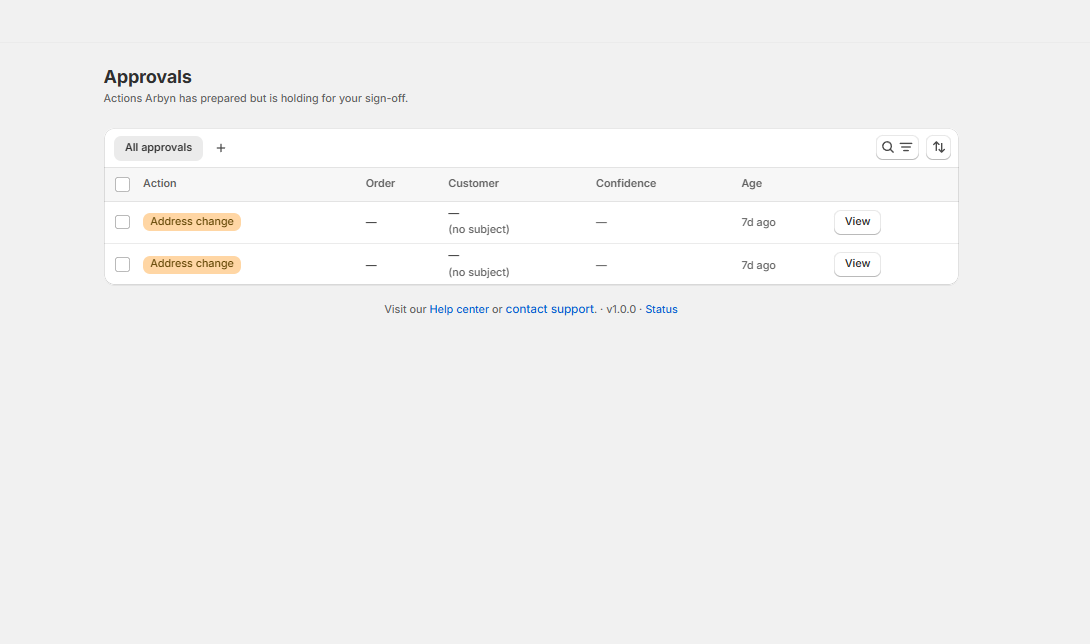
That brief pause when you see an action in your support queue marked "Waiting for Approval" can be unsettling, creating a flicker of uncertainty in a busy day. The immediate assumption for many store owners is that something is broken, that the AI is stuck in a loop, or worse, that a customer's urgent request is lost in a digital limbo. For any store owner managing dozens, if not hundreds, of conversations, a pending cancellation or a refund request that isn't instantly resolved feels like a problem to be solved, a fire to be put out. But with Arbyn, that "stuck" state for a Quick Action is not a bug to be fixed; it is a critical feature working exactly as designed. It represents a deliberate, foundational principle: automation should provide powerful leverage, but the store owner must always keep absolute, iron-clad control over the money. That pause is your power, a built-in checkpoint ensuring no dollar ever moves and no order is ever voided without your explicit consent. It’s a strategic checkpoint, not a technical roadblock, and learning how to leverage it transforms a moment of initial confusion into a precise exercise of operational and financial command.
The Anatomy of Automation Anxiety
Handing an AI agent the keys to your Shopify store, granting it permissions to interact with customers and modify orders, is a significant leap of faith. The promise of automated support, handling endless order status inquiries, answering complex product questions, and resolving common issues 24/7, is immense and tantalizing. But the perceived risks are just as substantial. A recent study highlighted that a significant number of business leaders, nearly 39%, feel their personal reputation is on the line if an AI project goes wrong due to bad data or insecure implementation. This anxiety is not unfounded, particularly in the fast-paced world of e-commerce, where the consequences of a single error are immediate, tangible, and often public. Imagine an AI incorrectly processing a thousand-dollar refund on a high-value order based on a subtle misinterpretation of a customer's message, or automatically cancelling a complex, multi-item wholesale order because it flagged a legitimate international payment as potentially fraudulent. These aren't just technical glitches; they are direct, quantifiable threats to your revenue, your inventory accuracy, and the trust you've painstakingly built with your customers. The potential for AI agents to modify accounts and issue refunds brings with it inherent risks like unauthorized data exposure and session hijacking. The very core of this "automation anxiety" stems from a deep-seated, rational fear of losing control, a worry that the undeniable efficiency gains from AI come at the steep price of careful, nuanced human judgment.
This fear is precisely why many savvy store owners hesitate to adopt fully autonomous systems for their most critical, high-stakes tasks. It's a healthy skepticism born from experience. A report from early 2025 noted that a lack of trust remains a primary reason employees resist the adoption of AI, with many fearing the professional and financial consequences of an irresponsible deployment. In the specific world of a Shopify business, these high-stakes tasks are the ones that directly touch your finances and inventory: issuing a refund of any amount, cancelling a customer's order, creating a unique discount code, or sending a digital gift card. Each of these seemingly simple actions involves a direct, and often permanent, API call to Shopify that alters an order or creates a new financial liability. A fully autonomous agent, operating without any human oversight or approval gate, could theoretically process hundreds of these irreversible actions in mere minutes. While it might correctly handle 99% of them with superhuman speed, the 1% of errors, a refund sent for a product that was never actually returned, a cancellation processed after an expensive item has already been shipped from your 3PL, can create financial losses and operational chaos that far outweigh the benefits of the automation. This is the central tension of AI in commerce today: the constant push for maximum efficiency versus the non-negotiable, absolute need for financial and operational control.
The industry is increasingly recognizing that the most effective, reliable, and trustworthy AI systems are not the ones that attempt to remove humans from the equation entirely, but the ones that intelligently and strategically integrate them. This powerful concept, known as "Human-in-the-Loop" (HITL), builds a collaborative framework where the AI handles the heavy lifting of repetitive, data-driven tasks, but deliberately pauses to request human review when its confidence is low or, more importantly, when the stakes are high. It’s a model that perfectly balances the speed and scalability of automation with the nuanced judgment and contextual awareness of an experienced store owner. For sensitive financial decisions, a HITL approach is not a fallback or a temporary crutch; it is a strategic imperative for risk management. Research has shown that people often distrust purely algorithmic outputs in high-stakes domains, and allowing a human expert to review, adjust, or override an AI's proposed action is crucial for building organizational and customer confidence. This is the philosophical foundation behind Arbyn's Quick Actions. The system is meticulously designed to do all the preparatory work, but it waits for your go-ahead on the decisions that matter most, transforming the pervasive anxiety of automation into a tangible feeling of empowered, scalable oversight.
A Look Under the Hood: How Shopify Actions Actually Work
To truly appreciate why an approval gate is so critical, it’s helpful to understand what is happening behind the scenes when an application like Arbyn interacts with your Shopify store. These are not simple text-based commands or suggestions; they are structured, permission-gated API calls that directly read from and write to your store’s core database, manipulating your official business records. When an AI agent tells a customer "I've looked up your order," it's performing a "read" operation. It sends a secure request to Shopify's API, asking for specific information associated with an order ID, such as its fulfillment status or tracking number. This is a relatively low-risk action, as the agent is merely retrieving and presenting data that already exists. But when the conversation pivots to "I can cancel that for you" or "I'll issue a refund for that item," the agent is preparing to perform a "write" operation. This is a fundamentally different and exponentially higher-stakes process. It involves sending a specific mutation via Shopify's GraphQL Admin API, commands like `orderCancel` or `refundCreate`, that permanently alters the state of your store's records. These mutations are irreversible by design and have immediate, direct financial and logistical consequences that must be managed with extreme care.
Let's consider the `orderCancel` mutation in more detail. When an app invokes this API call, it's not just flagging an order as "cancelled" in a spreadsheet for later review. The API call can trigger a powerful cascade of interconnected events within the Shopify ecosystem. It can simultaneously process a full refund to the customer's original payment method, signal your inventory management system or 3PL to restock the items, and trigger a cancellation notification email to the customer. The Shopify API provides specific parameters to control each of these subsequent steps, such as `restock` or the `reason` for the cancellation. However, the core action is final and cannot be undone. Similarly, the `refundCreate` mutation is a powerful financial tool that allows a developer to programmatically manage the entire refund process. The API is sophisticated enough to handle partial refunds for specific line items, refunds for shipping costs, and even issue the refund amount as store credit instead of to the original payment method. Executing this mutation creates a formal `Refund` object and a corresponding transaction record associated with the order, which serves as a permanent financial document for your bookkeeping. The existence of these powerful, direct API endpoints is what makes advanced AI support possible, but it is also what makes unchecked, fully autonomous action so potentially hazardous to your bottom line.
The security and integrity of these powerful actions are governed by Shopify's robust permissions model. An app cannot simply decide to cancel an order on its own whim; it must have been explicitly granted the `write_orders` access scope by the store owner during the installation process. This is the digital handshake where you, the store owner, consciously grant an application the right to make binding changes on your behalf. When you install an AI agent, you are extending a significant amount of trust and delegating these powerful permissions to a piece of software. This is precisely why the design of the AI itself is so crucial. A poorly designed or overly aggressive system could easily misinterpret a customer's ambiguous query and trigger an unwanted cancellation or refund. For example, a customer asking, "I was thinking of cancelling my order because I'm not sure it will arrive in time, what's your policy?" could be misread by a less sophisticated AI as a direct command to cancel, rather than a request for information. This is where the risk of over-automation becomes a tangible threat to your operations. The system must be able to differentiate between a customer's inquiry and their explicit intent to act. The approval gate in Arbyn serves as that final, crucial checkpoint before one of these powerful API mutations is sent, ensuring that the permissions you delegated are only used when you, the store owner, have personally verified the customer's intent and approved the financial consequence.
Not a Bug, A Feature: Understanding Arbyn's Approval Gate
The core of the issue, and the reason you're sometimes seeing an `arbyn quick action stuck approval` status, lies in a deliberate and foundational design choice: Arbyn operates on a two-layer system for all store actions. It's absolutely crucial to distinguish between what the agent can do completely on its own and what it meticulously prepares for your final sign-off. This very distinction is the bedrock of Arbyn’s entire philosophy of safe, controlled, and scalable automation. The first layer consists of fully autonomous, non-financial, informational actions. When a customer asks for their order status (a classic "Where Is My Order?" or WISMO query), needs to update a shipping address before the order has been fulfilled, or asks a question about product specifications, Arbyn can handle it end-to-end. It reads the necessary order data from Shopify, provides the tracking information, executes the `orderEditAddShippingAddress` mutation, or synthesizes an answer from your knowledge base without requiring any human intervention. These are high-frequency, low-risk tasks where full autonomy provides maximum efficiency without exposing you to any financial liability or inventory risk, allowing your team to focus on higher-value work.
The second layer, however, is reserved for what we call "Quick Actions." This category covers all the money-moving and logistically significant operations that carry real financial or inventory consequences: cancelling an order, issuing a partial or full refund, creating a unique discount code, sending a gift card, reshipping a lost or damaged order, or initiating a return through an integration with your returns provider. For every single one of these actions, Arbyn performs all the complex and tedious preparatory work. It uses its language understanding to parse the customer's request, identifies the correct order and specific line items, calculates the precise refund amount including prorated taxes and shipping, and tees up the exact Shopify API mutation required, whether it's `orderCancel`, `refundCreate`, or `giftCardCreate`. But it does not, and will not, execute it on its own. Instead, it surfaces the perfectly prepared action directly in your conversation view with the clear status: "Waiting for Your Approval." This is the Human-in-the-Loop checkpoint in practice. The action is not "stuck"; it is paused, patiently awaiting the single tap from you or your trained staff that confirms the decision is correct and the action is authorized. This is the fundamental safeguard designed to keep you in absolute, unwavering control of your store's finances and operations.
This approval step is simultaneously the most misunderstood and most important aspect of the entire process. That "Approve" button is not a prompt for *you* to then go into the Shopify admin and manually perform the task yourself. It is the final trigger, the explicit authorization that empowers *Arbyn* to execute the fully prepared action on your behalf, instantly and accurately. The moment you click approve, Arbyn sends the corresponding, pre-formulated GraphQL mutation directly to Shopify's servers to complete the refund, cancellation, or other financial action. Immediately after receiving a success confirmation from the API, the agent confirms the action back to the customer in the conversation, closing the loop professionally. This model provides the absolute best of both worlds: the AI handles all the tedious, error-prone parts of the workflow, understanding the unstructured request, finding the right order among thousands, calculating the correct refund amount down to the cent, while you retain the simple, powerful, and instantaneous final say-so. It completely eliminates the risk of an AI making an autonomous financial error while still saving you the 90 seconds and dozen clicks it would take to perform the same action manually within the labyrinth of the Shopify admin. The "stuck" status is, in fact, the clearest possible sign of a system that respects your authority and protects your bottom line.
The Spectrum of Control in AI Support Tools
When evaluating AI support solutions for your e-commerce business, store owners are faced with a wide and often confusing spectrum of automation, ranging from simple data displays to the promise of fully autonomous agents. Understanding where different tools fall on this spectrum is absolutely key to choosing the right fit for your operational comfort level and your risk tolerance. At the most basic end, you have simple data connector plugins. Tools like Shopify's own free app for Zendesk are designed primarily as contextual viewers; they pull customer and order data into the helpdesk sidebar, saving agents the time of switching tabs to look up an order number or shipping address. While useful for providing context, the human agent still performs all actions and writes all replies manually. The automation is passive and informational only. Moving up the scale, you find advanced workflow plugins for platforms like Gorgias and Intercom, which allow agents to take action from within the helpdesk interface. An agent can click a button in a sidebar widget to process a refund or cancel an order without having to log into Shopify separately. These tools significantly optimize the human agent's workflow but are still fundamentally human-led; a person is required to initiate and complete every ticket that involves a store action.
The next significant leap is into the realm of AI-driven automation, and here, the landscape splits into several distinct philosophical approaches. Some tools continue to focus on rule-based automation. For example, within Gorgias, you can create intricate "Rules" that automatically tag, assign, or send a canned response to tickets based on keywords like "refund" or "missing item." This is a form of deterministic automation: if the message contains trigger X, then execute action Y. It's powerful for triage and routing but can lack the nuance to handle complex or ambiguous requests, often leading to frustrating customer experiences when the rules fail. Other platforms, like Intercom's Fin AI Agent, aim for more generative, end-to-end resolution, using advanced AI to understand customer intent and access Shopify data to answer questions or even take action. Some third-party agents running inside platforms like Zendesk also claim the ability to perform real actions like order edits, returns, and refunds. Recognizing the inherent risk, some of these tools offer a "draft-only mode" where the agent prepares the action or reply for a human to review and send. This is philosophically similar to Arbyn's approval gate, representing a growing acknowledgment across the industry that oversight is essential for sensitive workflows.
Arbyn's approach deliberately and confidently stakes out a clear, unambiguous position on this spectrum. It enthusiastically embraces full, unattended autonomy for low-risk, high-frequency informational tasks (like WISMO queries) where the cost of a potential error is negligible and the value of speed is paramount. But for any action that has a direct financial or irreversible inventory impact, it mandates a Human-in-the-Loop approval step. This is not a technical limitation, a setting that can be toggled off, or a missing feature; it is a core, immutable part of the product's design philosophy, built specifically to address the well-documented "trust gap" in AI. Recent studies on customer experience show that while consumers are increasingly interacting with AI-powered chatbots, a staggering number report frustration and a significant decrease in trust after a single poor experience. By ensuring a trained human store owner or store owner provides the final authorization for any money-moving action, Arbyn is engineered from the ground up to prevent those negative, trust-destroying experiences. It consciously rejects the risky all-or-nothing approach to autonomy, opting instead for a hybrid model that uses AI for leverage while preserving human judgment for control. This makes it a tool not just for support efficiency, but for strategic risk management.
Building a Bulletproof Approval Process
Simply understanding that the approval gate is a feature, not a flaw, is only the first step. The real operational leverage comes from building a clear, consistent, and documented process around how and when your team clicks that "Approve" button. This crucial step transforms the feature from a simple button into a structured financial control mechanism for your entire business. The goal is to define a set of internal rules, a playbook, that govern these Quick Actions, ensuring that every refund, cancellation, or discount is issued according to your store's official policies, not on a case-by-case whim or an agent's mood. This process doesn't need to be overly complicated, but it absolutely does need to be written down, trained on, and understood by anyone on your team who interacts with customer support. It's the human-powered software that runs on top of Arbyn's AI-powered hardware, creating a system of checks and balances that can scale as your business grows. This formal process is what separates an amateur operation from a professional one.
Start by defining the specific thresholds and required evidence for each type of Quick Action. For refunds, what is your official policy? Do you require photographic evidence of a damaged item? Is there a time limit for returns, such as 30 days from delivery? Your internal rule could be: "A refund action for a damaged item will only be approved after the customer has provided a clear photo of the defect. For returns, approval is granted only after tracking confirms the returned item is back in our possession." For cancellations, the key variable is almost always the fulfillment status. A simple, effective policy might be: "Cancellation actions can be approved immediately by any agent for any order that is still in 'Unfulfilled' status in Shopify. If any part of the order has been fulfilled or is 'In Transit', the action must be escalated to a manager for manual review to attempt a shipment intercept with our 3PL." This prevents you from refunding an order that's already on its way to the customer, a costly and common mistake.
Discounts and gift cards require a different, but equally important, kind of scrutiny, as they represent a direct and immediate impact on your product margin and profitability. Your policy here should be centered on clear justification. When is a discount an appropriate "make-good" for a poor experience, and when is it an unnecessary giveaway? A strong rule could state: "A discount action will only be approved if the conversation history shows a clear service failure (e.g., late shipment, wrong item sent) or if the customer is a designated VIP with a specific tag. All other discount requests are politely denied." For gift cards, which are equivalent to cash, the bar for approval should be even higher. The same logic applies to reshipments. Is a reshipment for a "lost in transit" package approved automatically, or only after the carrier's tracking investigation is complete and the package is declared lost? By writing down these simple, one-sentence rules, you create a playbook for your team that ensures consistency. This consistency is vital; it guarantees fair treatment for all customers and protects your business from thousands in preventable losses over time. The approval button is your tool; the policy is how you wield it with precision and authority.
Finally, this structured approval process creates an invaluable and permanent audit trail for your business. Every time a Quick Action is approved, it's a documented decision linked to a specific customer conversation, a specific order, and a specific team member, all time-stamped for future reference. This level of accountability is absolutely crucial for scaling your support operation and maintaining financial discipline. Instead of a manager wondering why a strange refund was issued a month ago, you can trace it back in seconds to the exact context and the person who approved it. This turns your support inbox from a chaotic stream of requests into a clear, auditable ledger of operational decisions. The clarity, control, and peace of mind provided by this system is the ultimate antidote to automation anxiety. You are no longer crossing your fingers and hoping the AI gets it right; you are leveraging AI to perfectly prepare decisions for you to confirm with a single, confident tap. This is the path to scaling your support without scaling your risk. If you're ready to implement an AI agent that gives you this level of control, you can install Arbyn free on the Shopify App Store and see how it feels to have an assistant that does all the work but always asks for permission before touching the money.
Written by
For seven years I have led customer success and technical support inside high-growth SaaS and e-commerce companies. Customer Support Lead at DripShop.live, a live-commerce SaaS. Technical Support Specialist at Replo (Y...
View full profile